Internal Training Agent for SOPs, Playbooks, and Onboarding

Turn SOPs, playbooks, and onboarding material into an always-available training agent that answers questions, explains processes, and helps employees learn faster.
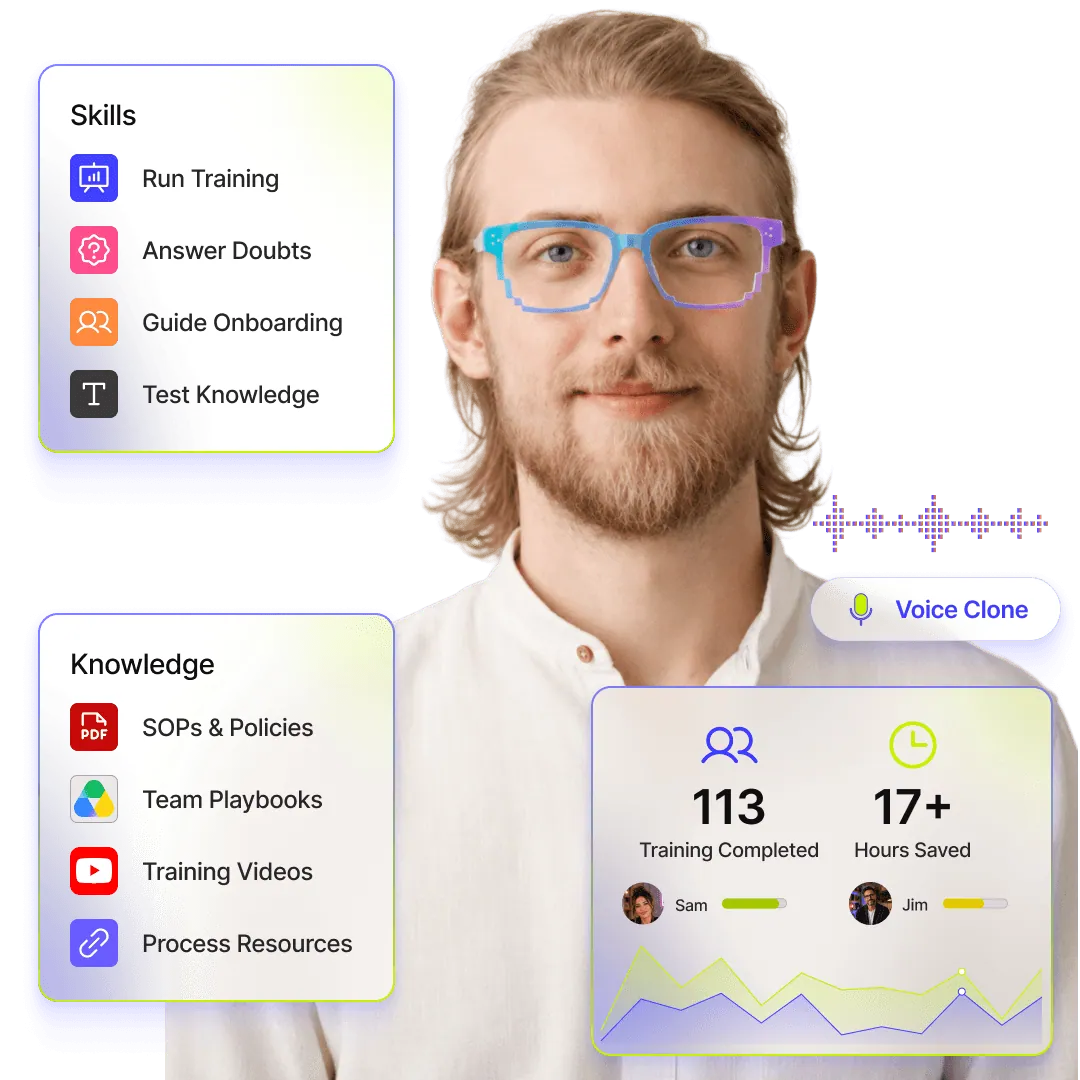
a voice Internal Training Agent hero image showing SOP training, onboarding guidance, knowledge checks, and team playbooks in an AI assistant interface.agent visualisation

Internal Training Agent for SOPs, Playbooks, and Onboarding

Turn SOPs, playbooks, and onboarding material into an always-available training agent that answers questions, explains processes, and helps employees learn faster.

a voice Internal Training Agent hero image showing SOP training, onboarding guidance, knowledge checks, and team playbooks in an AI assistant interface.agent visualisation

Internal Training Agent for SOPs, Playbooks, and Onboarding

Turn SOPs, playbooks, and onboarding material into an always-available training agent that answers questions, explains processes, and helps employees learn faster.

a voice Internal Training Agent hero image showing SOP training, onboarding guidance, knowledge checks, and team playbooks in an AI assistant interface.agent visualisation

What Internal Training Agent Can Do

What Internal Training Agent Can Do

Instant SOP Answers

Answer employee questions from SOPs, internal docs, process notes, and training material without making them search through folders.

Instant SOP Answers

Answer employee questions from SOPs, internal docs, process notes, and training material without making them search through folders.

Role Playbook Training

Train teams on the playbooks they need for their role, from sales and support to HR, operations, and customer success.

Role Playbook Training

Train teams on the playbooks they need for their role, from sales and support to HR, operations, and customer success.

New Hire Onboarding

Guide new employees through company basics, tools, workflows, expectations, and first-week learning material.

New Hire Onboarding

Guide new employees through company basics, tools, workflows, expectations, and first-week learning material.

Stepwise Process Walkthroughs

Break complex internal workflows into simple steps employees can follow while doing the actual work.

Stepwise Process Walkthroughs

Break complex internal workflows into simple steps employees can follow while doing the actual work.

Clear Policy Explanations

Explain company policies, approval flows, compliance rules, and internal guidelines in clear everyday language.

Clear Policy Explanations

Explain company policies, approval flows, compliance rules, and internal guidelines in clear everyday language.

Interactive Knowledge Checks

Run quick quizzes, practice questions, and learning checks to help employees remember what they just learned.

Interactive Knowledge Checks

Run quick quizzes, practice questions, and learning checks to help employees remember what they just learned.

Team Specific Training

Give each department training support based on its own documents, responsibilities, tools, and ways of working.

Team Specific Training

Give each department training support based on its own documents, responsibilities, tools, and ways of working.

Relevant Resource Sharing

Share the right PDFs, decks, links, documents, or training resources when an employee needs more context.

Relevant Resource Sharing

Share the right PDFs, decks, links, documents, or training resources when an employee needs more context.

Repeat Question Handling

Handle common internal questions instantly so managers and senior team members are not repeating the same answers every day.

Repeat Question Handling

Handle common internal questions instantly so managers and senior team members are not repeating the same answers every day.

Training Feedback Capture

Collect employee doubts, confusion, feedback, and knowledge gaps so your training material keeps improving.

Training Feedback Capture

Collect employee doubts, confusion, feedback, and knowledge gaps so your training material keeps improving.

Smart Manager Escalations

Route unanswered, sensitive, or unclear questions to the right trainer, manager, or team owner for follow-up.

Smart Manager Escalations

Route unanswered, sensitive, or unclear questions to the right trainer, manager, or team owner for follow-up.

24/7 Training Support

Give employees a training agent they can turn to anytime, across shifts, locations, and time zones.

24/7 Training Support

Give employees a training agent they can turn to anytime, across shifts, locations, and time zones.

BENEFITS

Built to Make Internal Training Actually Work

Help employees learn faster, reduce repeated questions, and make your SOPs, playbooks, and onboarding material useful in everyday work.

Faster Employee Onboarding

New hires do not have to wait for managers, buddies, or HR to explain every small thing. They can start learning company processes from day one.

Faster Employee Onboarding

New hires do not have to wait for managers, buddies, or HR to explain every small thing. They can start learning company processes from day one.

Fewer Repeated Questions

Reduce the daily load of answering the same SOP, policy, tool, and workflow questions across teams.

Fewer Repeated Questions

Reduce the daily load of answering the same SOP, policy, tool, and workflow questions across teams.

Better Process Adoption

Make it easier for employees to understand and follow the right process instead of guessing, skipping steps, or relying on outdated habits.

Better Process Adoption

Make it easier for employees to understand and follow the right process instead of guessing, skipping steps, or relying on outdated habits.

Less Manager Dependency

Free managers and senior team members from basic training work so they can focus on coaching, decisions, and higher-value support.

Less Manager Dependency

Free managers and senior team members from basic training work so they can focus on coaching, decisions, and higher-value support.

Consistent Team Knowledge

Keep everyone learning from the same approved source of truth, across departments, locations, and shifts.

Consistent Team Knowledge

Keep everyone learning from the same approved source of truth, across departments, locations, and shifts.

Clearer Training Gaps

See where employees are confused, what they keep asking, and which parts of your training material need improvement.

Clearer Training Gaps

See where employees are confused, what they keep asking, and which parts of your training material need improvement.

Stop Repeating the Same Training Conversations Every Week

Give employees instant guidance on processes, policies, tools, and workflows without depending on managers for every answer.

Create Training Agent

Launching in phases. Limited access.

Stop Repeating the Same Training Conversations Every Week

Give employees instant guidance on processes, policies, tools, and workflows without depending on managers for every answer.

Create Training Agent

Launching in phases. Limited access.

Stop Repeating the Same Training Conversations Every Week

Give employees instant guidance on processes, policies, tools, and workflows without depending on managers for every answer.

Create Training Agent

Launching in phases. Limited access.

HOW IT WORKS

2 minutes is all it takes

STEP 1

Instant twin with LinkedIn import

Start with what you already have. Import your LinkedIn profile to instantly create a structured, credible base for your Digital Twin.

STEP 2

Clone your voice and personality

Record a quick sample to clone your voice and define your personality. Your Twin should sound, act, and respond—just like you.

STEP 3

Setup your twin's knowledge

Sync your websites, PDFs, and links. Your Twin is grounded strictly in your real-world data, ensuring every answer is accurate and on-brand.

STEP 4

Ready to talk at every touchpoint

Your Intelligent Identity is ready. Share your link, embed your Twin, and let it start talking, acting, and converting while you’re off the clock.

  • Email Signatures

  • Short URL for Socials

  • Meeting Backgrounds

  • Branded QR Codes

HOW IT WORKS

2 minutes is all it takes

STEP 1

Instant twin with LinkedIn import

Start with what you already have. Import your LinkedIn profile to instantly create a structured, credible base for your Digital Twin.

STEP 2

Clone your voice and personality

Record a quick sample to clone your voice and define your personality. Your Twin should sound, act, and respond—just like you.

STEP 3

Setup your twin's knowledge

Sync your websites, PDFs, and links. Your Twin is grounded strictly in your real-world data, ensuring every answer is accurate and on-brand.

STEP 4

Ready to talk at every touchpoint

Your Intelligent Identity is ready. Share your link, embed your Twin, and let it start talking, acting, and converting while you’re off the clock.

  • Email Signatures

  • Short URL for Socials

  • Meeting Backgrounds

  • Branded QR Codes

HOW IT WORKS

2 minutes is all it takes

STEP 1

Instant twin with LinkedIn import

Start with what you already have. Import your LinkedIn profile to instantly create a structured, credible base for your Digital Twin.

STEP 2

Clone your voice and personality

Record a quick sample to clone your voice and define your personality. Your Twin should sound, act, and respond—just like you.

STEP 3

Setup your twin's knowledge

Sync your websites, PDFs, and links. Your Twin is grounded strictly in your real-world data, ensuring every answer is accurate and on-brand.

STEP 4

Ready to talk at every touchpoint

Your Intelligent Identity is ready. Share your link, embed your Twin, and let it start talking, acting, and converting while you’re off the clock.

  • Email Signatures

  • Short URL for Socials

  • Meeting Backgrounds

  • Branded QR Codes

Questions before you build your Internal Training Agent?

Understand how your Internal Training Agent works, what it can be trained on, and how employees can use it every day.

What is an Internal Training Agent on TheDouble.ai?

An Internal Training Agent on TheDouble.ai is a conversational agent trained on your SOPs, playbooks, policies, onboarding material, and internal docs. Employees can ask it questions, learn processes, find resources, and get guidance without waiting for a manager or trainer.

How is this different from storing docs in Notion, Drive, or Confluence?

Docs are useful only when employees can find and understand them. Your Internal Training Agent turns those documents into answers, explanations, walkthroughs, and training conversations your team can use while working.

Can it help with new hire onboarding?

Yes. You can train it on onboarding docs, company policies, tool guides, first-week checklists, and role-specific material so new hires can learn faster and ask questions anytime.

Can it answer questions from our SOPs and playbooks?

Yes. You can upload or connect SOPs, playbooks, process docs, PDFs, and other training material so the agent can answer questions based on your approved internal knowledge.

Can different teams use it for different training needs?

Yes. You can create training experiences for different teams such as sales, support, HR, operations, or customer success, each focused on the knowledge, workflows, and playbooks that matter to that role.

Can it run quizzes or knowledge checks?

Yes. The agent can be set up to ask questions, collect responses, and help employees review what they have learned. This is useful for onboarding, policy training, process refreshers, and internal certification flows.

What happens when the agent does not know an answer?

You can define how it should respond when something is missing or unclear. It can admit that it does not know, suggest the right next step, collect the employee’s question, or route it to the right manager or team owner.

Can it reduce repeated questions for managers?

Yes. The agent can handle common questions around processes, policies, tools, workflows, and training material, so managers and senior team members do not have to repeat the same explanations every day.

Can employees use it outside office hours?

Yes. The agent stays available 24/7, so employees across shifts, locations, and time zones can get training support whenever they need it.

How do we keep the training answers updated?
You can update the agent’s knowledge by adding new documents, replacing outdated material, editing custom text, or refreshing the sources used for training. This helps your team keep learning from the latest approved information.

Ready to Meet Your
AI Twin?

Build the agent that sounds like you and responds like you.

Ready to Meet Your
AI Twin?

Build the agent that sounds like you and responds like you.

Ready to Meet Your
AI Twin?

Build the agent that sounds like you and responds like you.