Create a Sales Agent That Talks, Demos, and Converts

Your Sales Agent answers questions, presents your product, walks visitors through decks, qualifies intent, books meetings, and follows up using your knowledge, voice, and rules.
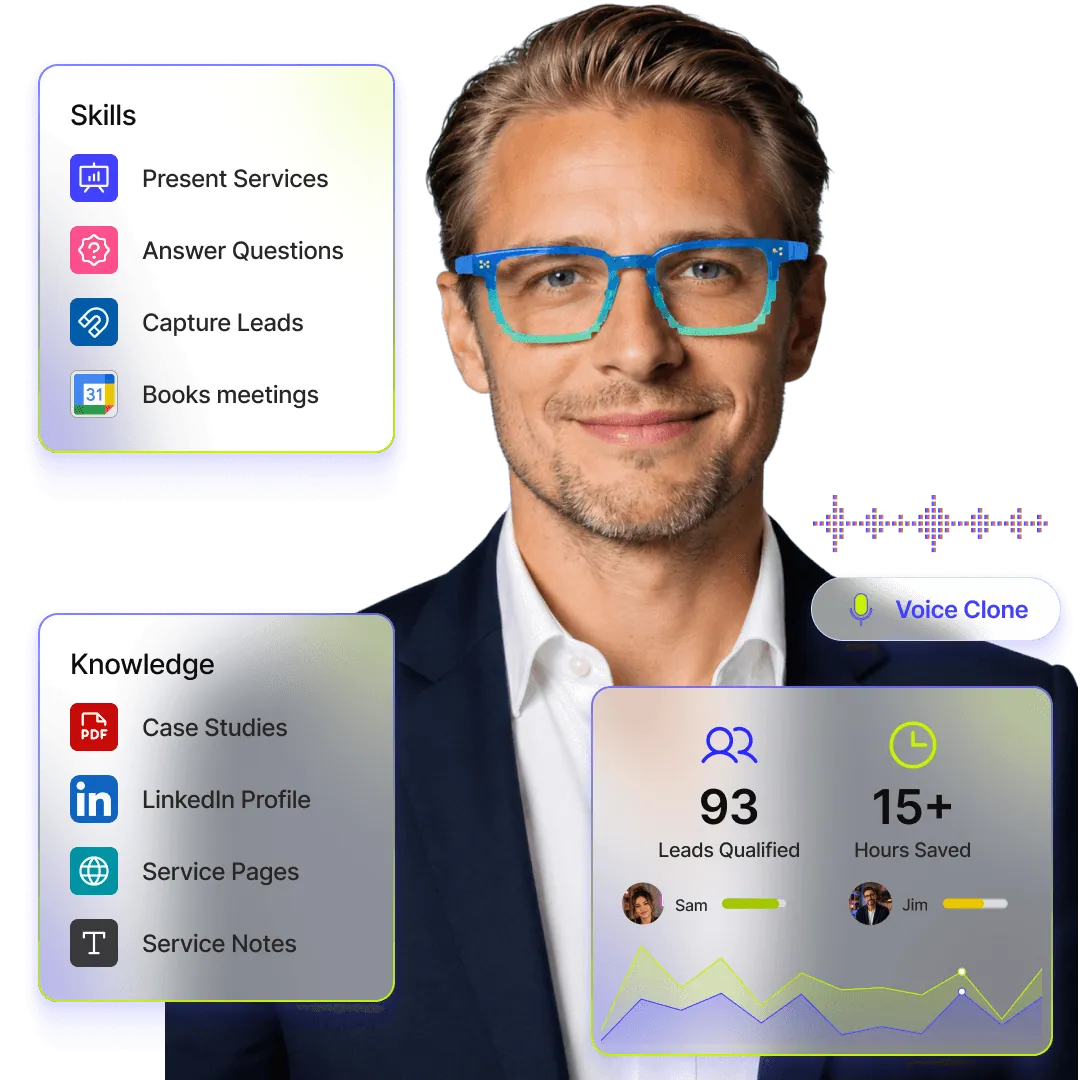
Sales Agent feature image showing product demos, buyer questions, meeting booking, CRM updates, sales decks, product pages, and sales performance metrics.

Create a Sales Agent That Talks, Demos, and Converts

Your Sales Agent answers questions, presents your product, walks visitors through decks, qualifies intent, books meetings, and follows up using your knowledge, voice, and rules.

Sales Agent feature image showing product demos, buyer questions, meeting booking, CRM updates, sales decks, product pages, and sales performance metrics.

Create a Sales Agent That Talks, Demos, and Converts

Your Sales Agent answers questions, presents your product, walks visitors through decks, qualifies intent, books meetings, and follows up using your knowledge, voice, and rules.

Sales Agent feature image showing product demos, buyer questions, meeting booking, CRM updates, sales decks, product pages, and sales performance metrics.

What the Sales Agent Can Do

What the Sales Agent Can Do

Answer sales questions in voice or text

Talk to visitors in a natural conversation and answer questions about your product, pricing, features, use cases, and next steps.

Answer sales questions in voice or text

Talk to visitors in a natural conversation and answer questions about your product, pricing, features, use cases, and next steps.

Demo products and sales decks

Walk visitors through pitch decks, product slides, PDFs, case studies, and sales material without making them read everything alone.

Demo products and sales decks

Walk visitors through pitch decks, product slides, PDFs, case studies, and sales material without making them read everything alone.

Qualify inbound leads

Ask the right questions to understand fit, company size, role, use case, urgency, budget, and buying intent.

Qualify inbound leads

Ask the right questions to understand fit, company size, role, use case, urgency, budget, and buying intent.

Send follow-ups

Trigger follow-up emails, share promised resources, remind interested leads, and continue the conversation after the first visit.

Send follow-ups

Trigger follow-up emails, share promised resources, remind interested leads, and continue the conversation after the first visit.

Share resources instantly

Send decks, brochures, case studies, demo links, product pages, docs, videos, and helpful resources during the conversation.

Share resources instantly

Send decks, brochures, case studies, demo links, product pages, docs, videos, and helpful resources during the conversation.

Present your product & service

Explain what your product does, who it is for, how it works, and why it matters in a guided, buyer-friendly way.

Present your product & service

Explain what your product does, who it is for, how it works, and why it matters in a guided, buyer-friendly way.

Handle pricing queries

Explain plans, packages, pricing logic, and next steps based on the visitor’s context.

Handle pricing queries

Explain plans, packages, pricing logic, and next steps based on the visitor’s context.

Book meetings

Find the right next step and help visitors book a demo, discovery call, or consultation.

Book meetings

Find the right next step and help visitors book a demo, discovery call, or consultation.

Answer objections

Respond to common concerns around pricing, integrations, setup time, security, comparison, support, and ROI.

Answer objections

Respond to common concerns around pricing, integrations, setup time, security, comparison, support, and ROI.

Update CRM & sales workflows

Push lead details into your CRM, spreadsheet, email flow, internal workflow, or sales process so nothing gets lost.

Update CRM & sales workflows

Push lead details into your CRM, spreadsheet, email flow, internal workflow, or sales process so nothing gets lost.

Guide product discovery

Help visitors explore the right features, pages, resources, and use cases based on what they are trying to solve.

Guide product discovery

Help visitors explore the right features, pages, resources, and use cases based on what they are trying to solve.

Capture lead context

Collect name, email, company, role, team size, need, timeline, and intent so your team gets context before the first call.

Capture lead context

Collect name, email, company, role, team size, need, timeline, and intent so your team gets context before the first call.

BENEFITS

Sell More Without Making Every Conversation Manual

Your Sales Agent gives every visitor a guided path from curiosity to clarity, qualification, and action.

Respond when buyers are interested

Be available the moment someone wants answers, even outside sales hours.

Respond when buyers are interested

Be available the moment someone wants answers, even outside sales hours.

Make every product explanation consistent

Keep your pitch, pricing, positioning, and answers aligned across every conversation.

Make every product explanation consistent

Keep your pitch, pricing, positioning, and answers aligned across every conversation.

Move visitors to the next step faster

Turn questions, demo requests, and deck views into qualified meetings and follow-ups.

Move visitors to the next step faster

Turn questions, demo requests, and deck views into qualified meetings and follow-ups.

Your Best Sales Conversation, Available Everywhere

Turn your website, link, QR, deck, and profile into an interactive sales touchpoint.

Create Sales Agent

Launching in phases. Limited access.

Your Best Sales Conversation, Available Everywhere

Turn your website, link, QR, deck, and profile into an interactive sales touchpoint.

Create Sales Agent

Launching in phases. Limited access.

Your Best Sales Conversation, Available Everywhere

Turn your website, link, QR, deck, and profile into an interactive sales touchpoint.

Create Sales Agent

Launching in phases. Limited access.

HOW IT WORKS

2 minutes is all it takes

STEP 1

Instant twin with LinkedIn import

Start with what you already have. Import your LinkedIn profile to instantly create a structured, credible base for your Digital Twin.

STEP 2

Clone your voice and personality

Record a quick sample to clone your voice and define your personality. Your Twin should sound, act, and respond—just like you.

STEP 3

Setup your twin's knowledge

Sync your websites, PDFs, and links. Your Twin is grounded strictly in your real-world data, ensuring every answer is accurate and on-brand.

STEP 4

Ready to talk at every touchpoint

Your Intelligent Identity is ready. Share your link, embed your Twin, and let it start talking, acting, and converting while you’re off the clock.

  • Email Signatures

  • Short URL for Socials

  • Meeting Backgrounds

  • Branded QR Codes

HOW IT WORKS

2 minutes is all it takes

STEP 1

Instant twin with LinkedIn import

Start with what you already have. Import your LinkedIn profile to instantly create a structured, credible base for your Digital Twin.

STEP 2

Clone your voice and personality

Record a quick sample to clone your voice and define your personality. Your Twin should sound, act, and respond—just like you.

STEP 3

Setup your twin's knowledge

Sync your websites, PDFs, and links. Your Twin is grounded strictly in your real-world data, ensuring every answer is accurate and on-brand.

STEP 4

Ready to talk at every touchpoint

Your Intelligent Identity is ready. Share your link, embed your Twin, and let it start talking, acting, and converting while you’re off the clock.

  • Email Signatures

  • Short URL for Socials

  • Meeting Backgrounds

  • Branded QR Codes

HOW IT WORKS

2 minutes is all it takes

STEP 1

Instant twin with LinkedIn import

Start with what you already have. Import your LinkedIn profile to instantly create a structured, credible base for your Digital Twin.

STEP 2

Clone your voice and personality

Record a quick sample to clone your voice and define your personality. Your Twin should sound, act, and respond—just like you.

STEP 3

Setup your twin's knowledge

Sync your websites, PDFs, and links. Your Twin is grounded strictly in your real-world data, ensuring every answer is accurate and on-brand.

STEP 4

Ready to talk at every touchpoint

Your Intelligent Identity is ready. Share your link, embed your Twin, and let it start talking, acting, and converting while you’re off the clock.

  • Email Signatures

  • Short URL for Socials

  • Meeting Backgrounds

  • Branded QR Codes

Questions before you build your Sales Agent?

Everything you need to know about how your Sales Agent talks, demos, qualifies, follows up, and stays under your control.

Can the Sales Agent present my product?

Yes. It can explain your product, guide visitors through your value proposition, and answer questions based on your approved knowledge.

Can it demo slides or sales decks?

Yes. You can train it on decks, PDFs, pages, and resources so it can walk visitors through your material and answer questions around it.

Can it qualify leads?

Yes. It can ask questions about role, company, use case, urgency, budget, and intent before moving the visitor to the next step.

Can it book sales calls?

Yes. It can guide qualified visitors to book a demo, discovery call, or consultation through your connected booking flow.

Can it answer pricing questions?

Yes. You can define what it should say about pricing, plans, packages, discounts, limits, and custom pricing.

Can it follow up after a conversation?

Yes. It can capture context and trigger follow-ups, emails, reminders, CRM updates, or other workflows depending on your setup.

Can it work on my website?

Yes. You can use it as a website agent, share it as a link, add it to your Double page, or place it in sales touchpoints like email signatures and QR codes.

Can I control what it says?

Yes. You control its knowledge, tone, instructions, lead capture rules, safety settings, and approved answers.

Is this only for sales teams?

No. Founders, consultants, agencies, creators, coaches, and business owners can use it to explain, qualify, demo, and convert interest.

Questions before you build your Sales Agent?

Everything you need to know about how your Sales Agent talks, demos, qualifies, follows up, and stays under your control.

Can the Sales Agent present my product?

Yes. It can explain your product, guide visitors through your value proposition, and answer questions based on your approved knowledge.

Can it demo slides or sales decks?

Yes. You can train it on decks, PDFs, pages, and resources so it can walk visitors through your material and answer questions around it.

Can it qualify leads?

Yes. It can ask questions about role, company, use case, urgency, budget, and intent before moving the visitor to the next step.

Can it book sales calls?

Yes. It can guide qualified visitors to book a demo, discovery call, or consultation through your connected booking flow.

Can it answer pricing questions?

Yes. You can define what it should say about pricing, plans, packages, discounts, limits, and custom pricing.

Can it follow up after a conversation?

Yes. It can capture context and trigger follow-ups, emails, reminders, CRM updates, or other workflows depending on your setup.

Can it work on my website?

Yes. You can use it as a website agent, share it as a link, add it to your Double page, or place it in sales touchpoints like email signatures and QR codes.

Can I control what it says?

Yes. You control its knowledge, tone, instructions, lead capture rules, safety settings, and approved answers.

Is this only for sales teams?

No. Founders, consultants, agencies, creators, coaches, and business owners can use it to explain, qualify, demo, and convert interest.

Questions before you build your Sales Agent?

Everything you need to know about how your Sales Agent talks, demos, qualifies, follows up, and stays under your control.

Can the Sales Agent present my product?

Yes. It can explain your product, guide visitors through your value proposition, and answer questions based on your approved knowledge.

Can it demo slides or sales decks?

Yes. You can train it on decks, PDFs, pages, and resources so it can walk visitors through your material and answer questions around it.

Can it qualify leads?

Yes. It can ask questions about role, company, use case, urgency, budget, and intent before moving the visitor to the next step.

Can it book sales calls?

Yes. It can guide qualified visitors to book a demo, discovery call, or consultation through your connected booking flow.

Can it answer pricing questions?

Yes. You can define what it should say about pricing, plans, packages, discounts, limits, and custom pricing.

Can it follow up after a conversation?

Yes. It can capture context and trigger follow-ups, emails, reminders, CRM updates, or other workflows depending on your setup.

Can it work on my website?

Yes. You can use it as a website agent, share it as a link, add it to your Double page, or place it in sales touchpoints like email signatures and QR codes.

Can I control what it says?

Yes. You control its knowledge, tone, instructions, lead capture rules, safety settings, and approved answers.

Is this only for sales teams?

No. Founders, consultants, agencies, creators, coaches, and business owners can use it to explain, qualify, demo, and convert interest.

Ready to Meet Your
AI Twin?

Build the agent that sounds like you and responds like you.

Ready to Meet Your
AI Twin?

Build the agent that sounds like you and responds like you.

Ready to Meet Your
AI Twin?

Build the agent that sounds like you and responds like you.